10 Reasons why:
1) Why should I consider replacing my mouse?
If you spend long hours using a mouse, you may experience wrist deviation, finger joint stiffness, and cumulative forearm tension. A traditional mouse relies on repetitive, small-range movements driven primarily by the wrist and fingers.
A Pen Tablet shifts movement to a larger kinetic chain, engaging the shoulder and forearm, reducing localized strain and repetitive micro-motions. For many professionals, this translates into less fatigue and greater comfort during extended sessions.
2) How is a Pen Tablet more ergonomic than a mouse?
A mouse:
- Encourages wrist-driven motion
- Requires continuous gripping
- Promotes repetitive micro-adjustments
A Pen Tablet:
- Distributes effort across the shoulder and forearm
- Requires lighter grip force
- Encourages a neutral, writing-like posture
- Reduces repetitive strain patterns
The result is a more natural biomechanical alignment that better supports sustained daily use.
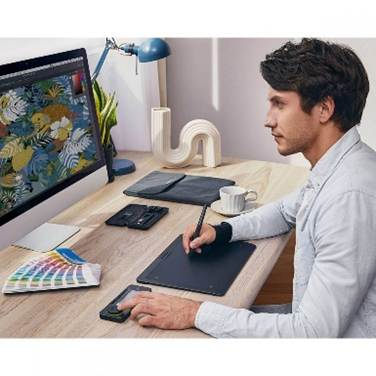
3) What is “absolute positioning,” and why does it matter?
A mouse uses relative positioning, you drag across one surface to move a cursor on another.
Pen Tablets and Pen Displays use absolute positioning, your pen maps directly to a specific point on the screen.
This reduces cognitive translation. Instead of “pushing” a cursor, you point exactly where you want to work.
On the Xencelabs Pen Display 24, for example, the pen tip lands precisely where your eye is focused. Even with a non-display tablet (opaque tablet, like the Pen Tablet), tapping a corner of the tablet moves you instantly to the corresponding corner of your monitor.
This increases speed and reduces repetitive dragging across large screens.
4) Does it actually improve precision?
Yes, especially for detailed work.
A pen device enables:
- Fine masking and selections
- Smoother Bezier curve adjustments, and better line attenuation when drawing
- Accurate retouching
- More controlled timeline scrubbing
- Subtle UI refinements
Pressure sensitivity adds an additional control dimension absent in a mouse. You’re not just clicking, you’re modulating intensity. Using another dimension, pen pressure to create that perfect, natural line.
Fewer corrective steps. Faster iteration.
5) How do programmable shortcuts improve workflow?
Xencelabs devices include customizable controls such as Quick Keys (buttons and dial), programmable pen buttons, and Tablet buttons.
You can assign:
- Undo / Redo
- Brush size adjustments
- Zoom
- Modifier keys
- Application-specific shortcuts
Any keyboard shortcut can be programmed into the Dial or Buttons on your Xencelabs device.
This reduces keyboard reach and context switching. Keeping your dominant hand in motion supports uninterrupted workflow and deeper concentration.
6) Is this only useful for illustrators?
No. While often associated with digital art, pen devices benefit a wide range of professionals:
- Photo retouching: Natural dodge and burn, masking, cloning, removing
- Video editing: Faster timeline navigation, scrubbing, and camera shuttles
- 3D modeling: Improved sculpting precision
- Document review: Fluid annotation and markup
- General productivity: Efficient multi-monitor navigation
Once adapted, many users prefer a pen over a mouse.
7) Will there be a learning curve?
Yes, but it’s short.
Expect several days of recalibration. Hand-eye coordination will initially feel different. However, because writing and sketching are deeply ingrained motor skills, most users adapt quickly.
Once muscle memory develops, the pen often feels more intuitive than a mouse for detailed work.
To shorten the learning process, I suggest you download a game such as Solitaire or Mahjong and play it on your Pen Tablet.
You will be amazed at how quickly this will build your eye-hand coordination.
8) Does switching reduce long-term strain?
While no device can guarantee elimination of strain, pen tablets typically reduce cumulative micro-stress by:
- Lowering grip force
- Minimizing wrist deviation
- Increasing range of motion
- Distributing muscular load
Over time, this can support more sustainable output and improved daily comfort.
Comfort is not cosmetic—it directly affects performance consistency.
9) What are the primary benefits of upgrading?
A Xencelabs Pen Tablet or Pen Display offers:
- Improved ergonomics
- Higher spatial precision
- Faster task execution
- Customizable workflow control
- More sustainable long-session comfort
When tools align with natural biomechanics, productivity compounds.
10) Still unsure about making the switch?
If you’re evaluating whether a Pen Tablet or Pen Display fits your workflow, contact CustomerCare@Xencelabs.com. The support team can answer technical questions and help you transition smoothly.